Fish Sort Puzzle
Now playing
Play Fish Sort Puzzle
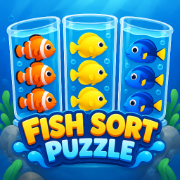
Pop bubble fish into matching tanks and clear the aquarium.
Fish Sort Puzzle
Now playing
Pop bubble fish into matching tanks and clear the aquarium.
Game overview
Pop bubble fish into matching tanks and clear the aquarium.
Fish Sort Puzzle is a free underwater sorting puzzle, and this page is where you play it: press Play and the aquarium loads straight into the tab — no download, no install, no account. Fish arrive trapped in floating bubbles, and your job is to drop each one into a tank that already holds its own kind, clearing that tank once three match. It plays the same with a mouse on desktop and with taps on a phone, and your progress stays saved in your browser between visits. For the rules in full — the holding tray, the boosters, and what to do when a board locks up — read the complete Fish Sort Puzzle guide. The catalog here collects 12 sorting and logic puzzles in all.
How to play
Tap a fish inside a floating bubble to pick it up.
Drop it into a tank that already holds the same kind of fish. Three matching fish clear the tank.
Watch the holding tray. A fish with no matching tank waits there, and the tray only holds so many — that's the real puzzle.
When the board jams, use a booster to clear a fish or make room.
Clearing tanks unlocks new aquarium scenes and adds fish to your collection.
FAQ
Yes. The whole game runs in your browser for free — no download and no account.
No. Tap Play and the game loads right here on this page.
Yes. It works with a mouse on desktop and with tap controls on mobile.
Any fish without a matching tank has to wait in the tray, and the tray has limited space — that's the challenge. Use a booster to clear it before it gets full.
Progress is saved in your browser's local storage, so it's still there when you come back on the same device and browser. Clearing your browser's site data will reset it.
Controls